

| informative -> Tooltips Part II |  |
 In
this sample you can see the integrated support to display standard tooltips.
In
this sample you can see the integrated support to display standard tooltips.
Since version 4.8 DHTML Menu Builder can display standard tooltips based on the
text displayed on the browser's status bar.
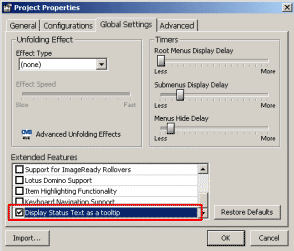
To enable this option simply define your tooltip text on the "Status Text" parameter for each one of your menu items, click File->Project Properties->Global Settings and enable the "Display Status Text as a tooltip" option under the "Extended Features" section.
Additionally, DHTML Menu Builder supports two meta-variables for the Status Text field:
As you can see on this sample, when you move the mouse over any menu item you see a tooltip saying "You have selected the ..... item". This is because we have set the "Status Text" of all menu items as shown here:
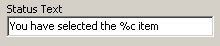
This means that DHTML Menu Builder will substitute the %c for the caption of the corresponding menu item.
 Download This Project